Bedrock Edition Support Settings
This step-by-step guide will walk you through configuring support for Minecraft: Bedrock Edition in the Goxy Dashboard. Enable players to join your network using Bedrock Edition, expanding your server's accessibility. Ready to open your network to Bedrock players?
Enable Bedrock Edition support in just a few clicks and invite players from all platforms!
Before You Begin
In this section, you'll enable players using Minecraft: Bedrock Edition to join your network. Once enabled, players on mobile devices, consoles, and Windows 10/11 can connect.
Bedrock Edition support does not affect Java Edition players. Both versions can coexist in your network if your servers are properly configured.
Configuring Bedrock Edition Support
Step 1: Go to the Bedrock Edition Support Section
- In the Goxy Dashboard, go to your network settings.
- Select Additional Settings, then the Bedrock Edition Support tab.
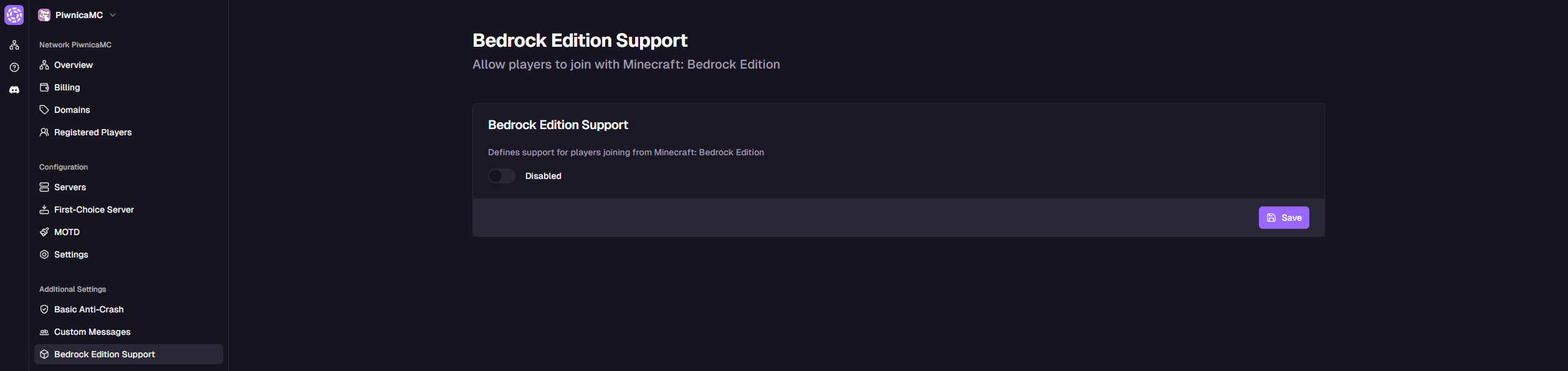
- You'll see the option to enable Bedrock Edition support.
Step 2: Enable Bedrock Edition Support
-
In the Bedrock Edition Support section, choose one of the following options:
Option Description Enabled Allows players to join using Minecraft: Bedrock Edition. Disabled Blocks access for Bedrock Edition players. Default: Disabled
⚠️Important: Disabling SupportIf disabled, Bedrock Edition players will not be able to join your network.
-
Click the Save button.
Your network is now ready for Minecraft: Bedrock Edition players!
Accessibility
Let Bedrock Edition players join your network.
Easy Setup
Enable Bedrock support in one step.
Larger Community
Attract players from mobile devices and consoles.
Links
Contact us!
We respond to all messages within 24 hours on Discord.
Enable Bedrock Edition & Grow Your Community!
Join Goxy and open your network to players across platforms!
REGISTER FOR FREE